

Kubernetes Instance: 3 Meanings (Replicas, Nodes, and Dedicated Clusters)
The phrase "Kubernetes instance" is ambiguous in technical discussions. Depending on context, it can mean (1) application instances (replicas), (2) VM instances that serve as Kubernetes nodes, or (3) a complete Kubernetes cluster as an "instance" of an environment. Therefore, you should clarify what you mean before designing infrastructure or purchasing services.
This guide explains all three meanings, shows when each interpretation applies, and helps you decide which operating model fits your needs. In addition, we'll cover when a dedicated Kubernetes instance — a complete cluster on dedicated infrastructure — makes the most sense.
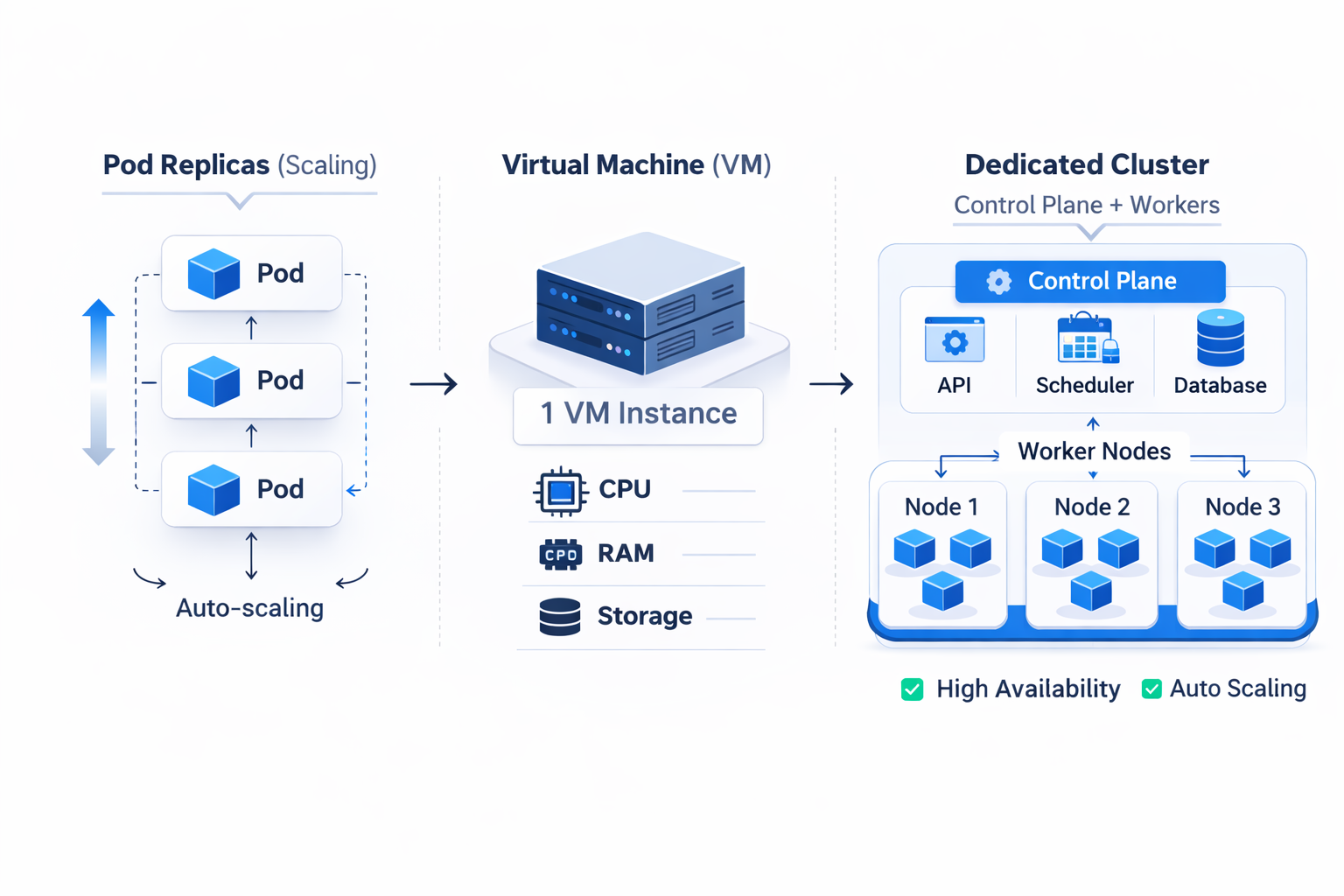
Kubernetes instance meaning #1: Replicas (multiple instances of your application)
In Kubernetes tutorials and scaling documentation, "instance" often refers to replicas — multiple copies of the same application Pod running simultaneously. For example, if you scale a Deployment to 5 replicas, Kubernetes creates 5 instances (Pods) of your application.
This usage appears in official Kubernetes documentation. The Running Multiple Instances of Your App tutorial demonstrates scaling replicas for high availability and load distribution.
In this context, "instance" means a single running copy of your containerized workload. However, this is just one of three common meanings.
Kubernetes instance meaning #2: VM instances as Kubernetes nodes
In cloud infrastructure and cost discussions, "instance" typically refers to virtual machine types used as Kubernetes worker nodes. For example, teams compare instance sizes (vCPU, RAM, storage) to decide which VM specifications their nodes should use.
Tools like the Kubernetes instance calculator help teams estimate costs by selecting instance types and calculating cluster capacity. In addition, cloud provider documentation frequently uses "instance" to describe their VM offerings for Kubernetes nodes.
In this meaning, "instance" refers to the underlying compute resources — the VMs that provide CPU and memory to the cluster. This is distinct from both application replicas and complete cluster environments.
Kubernetes instance meaning #3: An entire cluster as a dedicated "instance"
Many teams say "we need a Kubernetes instance for project X," meaning a separate cluster that serves as a clear environment boundary. This is the closest meaning to what we call a Dedicated Kubernetes Instance.
In this interpretation, "instance" means the entire Kubernetes environment — control plane, worker nodes, networking, and storage — provisioned as a dedicated unit. This approach gives you a clear boundary between projects, teams, or lifecycle stages (dev vs staging vs production).
The "one VM → one cluster" model maps perfectly to this meaning. A dedicated VM runs both the Kubernetes control plane and worker node, giving you a complete functional cluster with predictable resources and no multi-tenant sharing.
For teams that want Kubernetes basics first, see our guide on what Kubernetes is.
Quick disambiguation: Which meaning applies to you?
Use this table to identify which "Kubernetes instance" meaning matches your situation:
MEANING | What it refers to | Next step |
|---|---|---|
Replicas | Multiple Pods of the same application | Configure HPA |
Node VM instances | Compute infrastructure sizing | Rightsize nodes, implement autoscaling, control costs |
Cluster instance | Separate Kubernetes environment | Choose: self-managed, managed service, or dedicated instance |
When a dedicated cluster instance is the right choice
If your goal is a complete, isolated Kubernetes environment with predictable cost and no tenant sharing, a dedicated cluster instance offers several advantages:
- Clear boundary: One project or lifecycle stage per cluster, with no noisy neighbors
- Predictable cost: Fixed monthly pricing with no surprise charges from dependent services
- Full control: Root access to the VM, upstream Kubernetes without vendor lock-in
- Simplified operations: No complex multi-tenant configuration or shared security boundaries
This model works especially well for small teams, agencies, and early-stage startups that need production-ready Kubernetes but lack the bandwidth for extensive platform engineering. In addition, it provides a natural upgrade path — start with a single-node cluster, then add nodes as your workload grows.
Kubernetes instance vs K8s instance: Is there a difference?
"K8s" is shorthand for "Kubernetes" (8 letters between K and s). The terms are interchangeable. However, "K8s instance" often appears in community discussions about single-server Kubernetes setups, particularly when developers ask about running Kubernetes on a VPS or single VM.
Conclusion
"Kubernetes instance" has three valid meanings depending on context: application replicas, VM node types, or a complete cluster environment. Therefore, always clarify which meaning applies before making infrastructure decisions.
For teams seeking a dedicated Kubernetes cluster with predictable costs and full control, a dedicated instance model often provides the most practical path to production. The key is matching the operating model to your team's reality.
Get a Dedicated Kubernetes Instance
Need a Kubernetes cluster you can deploy to now? Try HosteRium Dedicated Kubernetes Instance: a dedicated Kubernetes cluster (one VM → one cluster), private /24 network by default, one public ingress IP, fixed monthly pricing starting at €39, and full root access. Receive your kubeconfig in 5 minutes and deploy via Helm, kubectl, or CI/CD.